
We use cookies to help you navigate efficiently and perform certain functions. You will find detailed information about all cookies under each consent category below.
The cookies that are categorized as "Necessary" are stored on your browser as they are essential for enabling the basic functionalities of the site. ...
Necessary cookies are required to enable the basic features of this site, such as providing secure log-in or adjusting your consent preferences. These cookies do not store any personally identifiable data.
Functional cookies help perform certain functionalities like sharing the content of the website on social media platforms, collecting feedback, and other third-party features.
Analytical cookies are used to understand how visitors interact with the website. These cookies help provide information on metrics such as the number of visitors, bounce rate, traffic source, etc.
Performance cookies are used to understand and analyze the key performance indexes of the website which helps in delivering a better user experience for the visitors.
Advertisement cookies are used to provide visitors with customized advertisements based on the pages you visited previously and to analyze the effectiveness of the ad campaigns.
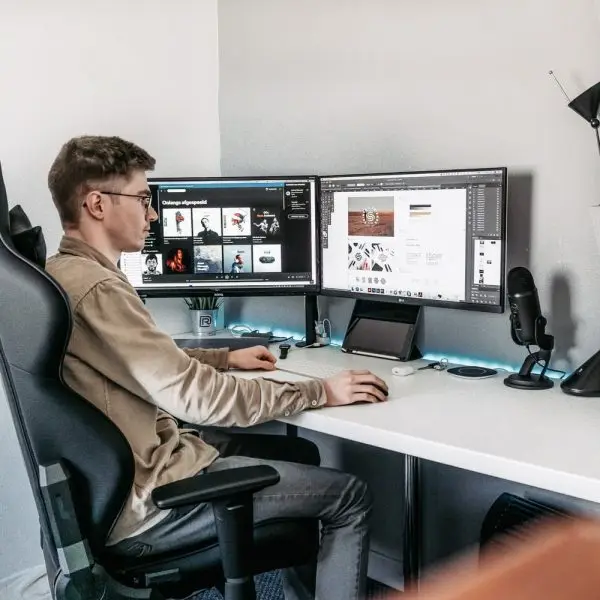
If you sit a lot in front of a computer, here are some tips to help your posture.
1) Support your back
Reduce your risk of back pain by adjusting your chair so your lower back is properly supported.
A correctly adjusted chair will reduce the strain on your back. Get 1 that is easily adjustable so you can change the height, back position and tilt. Your knees should be slightly lower than your hips. Use a footrest, if it feels necessary.
2) Adjust your chair
Adjust your chair height so you can use the keyboard with your wrists and forearms straight and level with the floor. This can help prevent repetitive strain injuries.
Your elbows should be by the side of your body so your arm forms an L-shape at the elbow joint.
3) Rest your feet on the floor
Place your feet flat on the floor. If they’re not, ask if you can have a footrest, which lets you rest your feet at a level that’s comfortable.
Don’t cross your legs, as this may contribute to posture-related problems.
4) Place your screen at eye level
Your screen should be directly in front of you. A good guide is to place the monitor about an arm's length away, with the top of the screen roughly at eye level.
To achieve this, you may need a monitor stand. If the screen is too high or too low, you’ll have to bend your neck, which can be uncomfortable.
5) Have the keyboard straight in front of you
Place your keyboard in front of you when typing.
Leave a gap of about 4 to 6 inches (100mm-150mm) at the front of the desk to rest your wrists between bouts of typing.
Keep your arms bent in an L-shape and your elbows by your sides.
Some people like to use a wrist rest to keep their wrists straight and at the same level as the keys.
For more information check out www.nhs.uk
We will keep you up-to-date with the latest blog posts, news and offers from Fit For Life NI